Here is a scenario that plays out in hundreds of Google Ads accounts every day. A campaign manager looks at a dashboard showing 87 conversions and a cost-per-conversion of $42. Leadership is happy. Budget increases are approved. Bids are raised. Three months later, the sales team reports that pipeline is flat. Revenue hasn’t moved.
The culprit, almost every time, is broken conversion tracking. The thank-you page fires on every refresh. The form view is being tracked instead of the form submission. A rogue plugin installed a second conversion tag three months ago and nobody noticed. The account is optimising toward phantom signals, and Smart Bidding is doing exactly what it was built to do — just in completely the wrong direction.
As paid search specialists, we audit accounts regularly. Broken or misconfigured conversion tracking is the single most common — and most expensive — issue we find. This guide gives you the exact 15-minute process we use to surface those errors, and a clear action plan for fixing them.
Why Your Conversion Data Is Probably Wrong Right Now
These numbers are uncomfortable, but they need to be on the table before you can take this audit seriously.
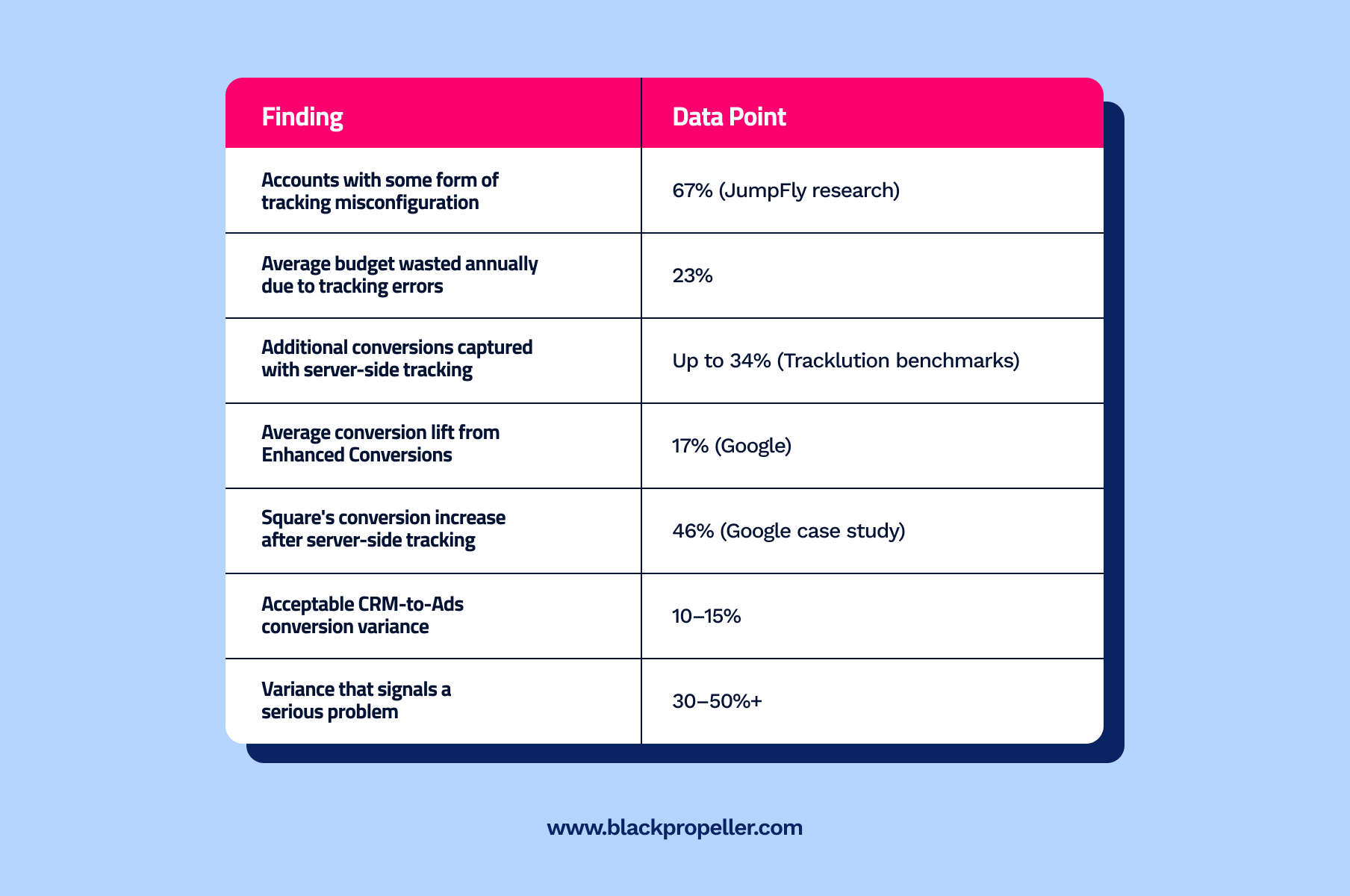
Key statistics highlighting tracking misconfigurations, budget loss, and conversion improvements through server-side tracking and enhanced conversions.
A $50,000-per-month Google Ads account with typical tracking errors is losing around $11,500 every month — not to poor targeting or bad creative, but to measurement failures a 15-minute audit would catch.
The root causes have multiplied in recent years. iOS privacy updates, browser cookie restrictions, ad blockers, cross-device journeys, and longer B2B sales cycles have all created new gaps between what actually happens and what Google Ads reports. As Stape’s server-side tracking research documents, adblockers, Intelligent Tracking Prevention, and third-party cookie restrictions are now the primary causes of conversion data loss — factors entirely outside your campaign settings. Client-side tags that worked perfectly in 2022 are quietly misfiring today.
The downstream consequences are serious. Pixis’s 2025 Google Advertising Benchmarks found that Maximize Conversions and Target ROAS together account for roughly two-thirds of advertiser spend — meaning the overwhelming majority of ad budgets are being managed by algorithms that are only as good as the conversion data they receive.
Before You Start: What You Are Actually Looking For
Most conversion tracking problems fall into three categories. Knowing which one you are dealing with determines which part of the audit to prioritise.
- Missing conversions. Google has no record of conversions that definitely happened. Tags are not firing, or they are firing on the wrong page.
- Phantom conversions. Google is recording conversions that never occurred. The most common cause is tracking page views of a thank-you page rather than validated form submissions.
- Duplicate conversions. The same real conversion is being counted multiple times — often because both a native Google Ads tag and a Google Analytics import are active simultaneously, or because a plugin added a second pixel without anyone noticing.
| Quick gut check before you audit: Pull your Google Ads conversion volume for the last 30 days. Then pull the matching data from your CRM or backend. A variance of more than 15% in either direction is a tracking problem. That single comparison, which takes two minutes, is worth doing right now before reading another word. |
The 15-Minute Conversion Tracking Audit
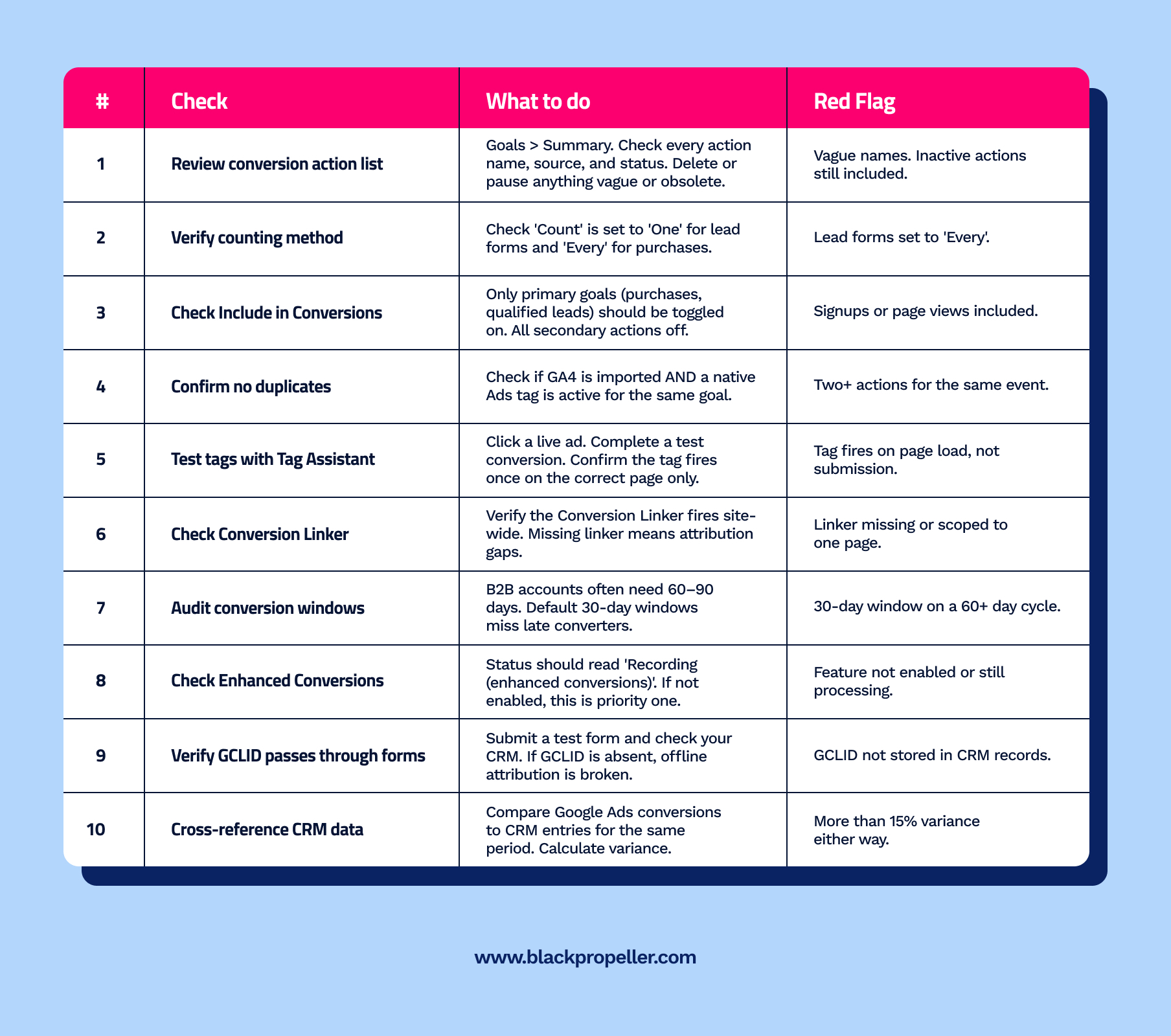
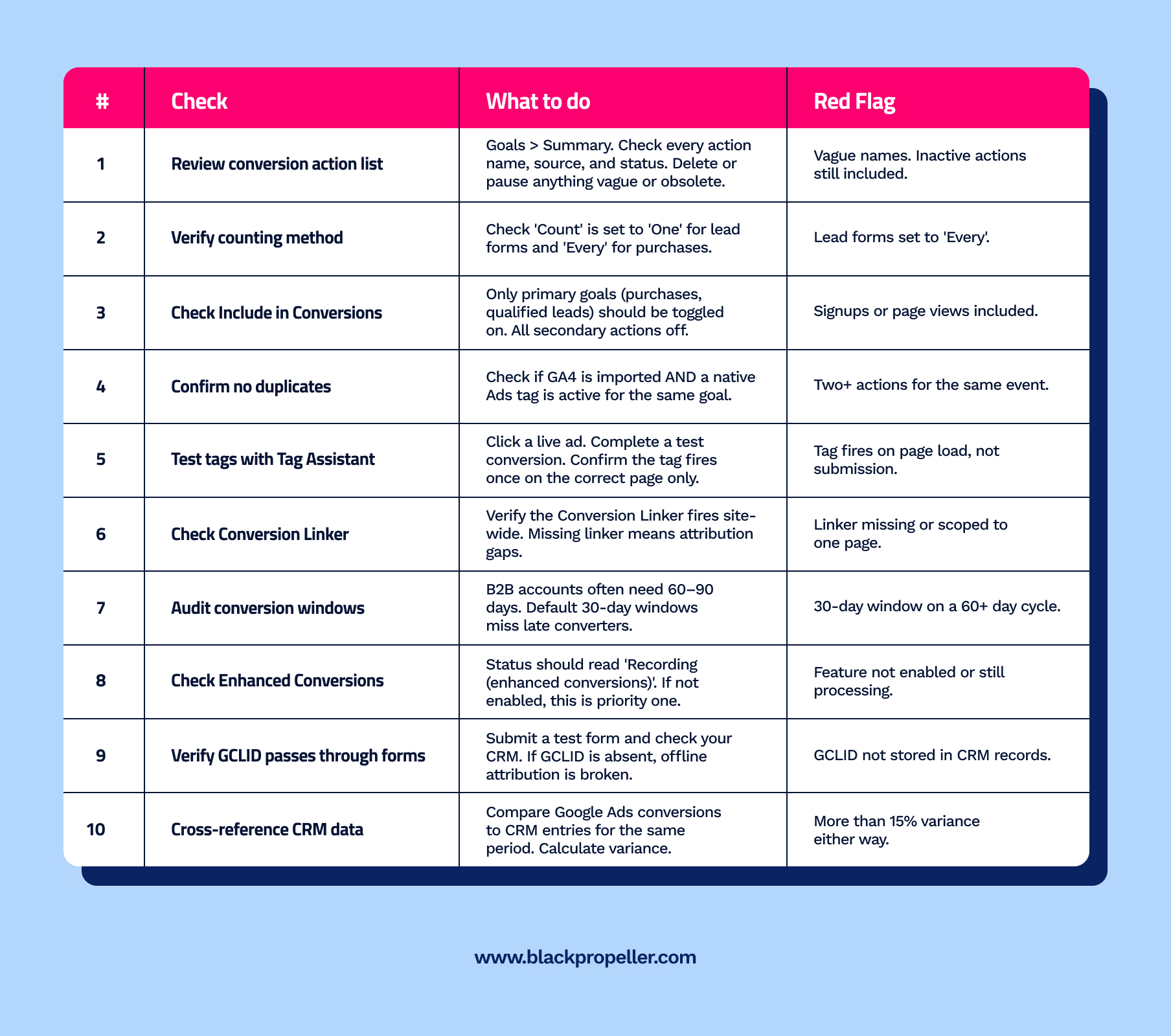
Work through these steps in order. Each one takes one to three minutes. Together they cover the most common failure points in Google Ads conversion tracking as it exists in 2026.
The Most Common Conversion Tracking Errors — And How to Fix Them
Error 1: Tracking Page Views Instead of Form Submissions
This is the most widespread error we encounter. The conversion tag is placed on a thank-you page and fires every single time that URL loads — including when users bookmark it, share it, or navigate back to it. The result is a conversion count that can be two, three, or ten times higher than actual leads generated.
The fix is event-based conversion tracking that only fires when a genuine form submission triggers the tag. Your tag should fire on a session-specific parameter — such as a unique transaction ID in the URL — or a session variable that confirms a submission just occurred, not simply that the thank-you page loaded. This is also why sending transaction IDs to Google Ads is worth implementing: it allows Google to identify and filter duplicate conversions automatically, giving you cleaner data and preventing over-bidding on phantom signals.
Error 2: Duplicate Conversion Actions
Duplicate tracking happens silently. You set up a native Google Ads conversion tag through GTM. Then you import the same goal from Google Analytics. Both are set to Include in Conversions: Yes. Every real conversion now counts twice, and Smart Bidding is optimising toward a fiction.
The same problem occurs when a website plugin or CMS integration installs a second Google Ads pixel without the account manager knowing. As Cometly’s 2026 guide to conversion tracking problems points out, it is surprisingly common to have multiple actions tracking the same event — one from GTM, another from hardcoded tracking, and a third from a plugin. Always check the Conversion Actions list for any entry you didn’t create deliberately, and run Tag Assistant on your conversion pages to see every tag that fires.
Error 3: Missing Conversion Linker Tag
The Conversion Linker tag sets first-party cookies that allow Google to attribute conversions to the correct ad clicks. It needs to fire on every page of your site — not just conversion pages. Without it, cross-site attribution gaps appear and the data your bidding algorithms receive becomes partial.
There is an additional dimension to this in 2026. As server-side tracking specialists TAGGRS explain, when URL parameters such as UTM tags are present, Firefox and Safari limit first-party cookie lifetimes to 24 hours. Without a server-side setup extending those windows, any conversion that happens more than a day after the initial click — common in B2B and higher-consideration purchases — may never be attributed correctly. Check GTM to confirm the Conversion Linker triggers on All Pages, then assess whether your account warrants a server-side upgrade.
Error 4: Conversion Windows That Don’t Match Your Sales Cycle
Google Ads defaults to a 30-day conversion window. For e-commerce, that is usually sufficient. For B2B companies with 60 to 90-day sales cycles, that window means a significant percentage of real conversions simply vanish from reporting. Smart Bidding never sees them, and campaigns that are genuinely generating pipeline get starved of signals and underperform accordingly.
Paid ads consultant Sarah Stemen, writing about Smart Bidding data requirements in 2026, identifies this directly: Smart Bidding needs at least 30 conversions per month to optimise reliably — and that threshold assumes your windows are long enough to capture all real conversions in the first place. A 30-day window on a 90-day sales cycle effectively cuts your visible conversion volume by more than half, making it almost impossible for automated bidding to learn correctly. Set your conversion window to match your actual sales cycle. Google supports windows up to 90 days for most conversion types.
Error 5: Spam Form Submissions Counted as Conversions
If your conversion volume looks strong but pipeline is flat, filter your CRM leads by source and examine actual contact quality. Bot spam and junk submissions can account for 30–50% of reported conversions on some accounts — particularly those using broad match keywords or Display targeting without sufficient exclusions.
Solutions include adding reCAPTCHA to forms, implementing hidden honeypot fields, and using validation logic that only fires the conversion tag after server-side confirmation of a legitimate submission. This is also worth examining alongside your Google Ads account structure and keyword strategy — certain campaign types and match type combinations are considerably more prone to low-quality traffic than others, and no amount of tracking cleanup will fix a traffic quality problem.
Enhanced Conversions: The 2026 Priority You Cannot Ignore
Enhanced conversions supplement your existing tracking by sending hashed first-party data — email addresses, phone numbers, and home addresses — to Google when a conversion occurs. Google uses SHA-256 encryption to hash this data before it leaves your site, then matches it against signed-in Google accounts to recover conversions that client-side cookies would have missed entirely.
Google reports a 17% average conversion lift from Enhanced Conversions. In practice, that figure is higher for accounts with significant cross-device traffic — users who click on mobile and convert later on desktop — because standard cookie-based attribution breaks across those sessions entirely, while hashed first-party data follows the user. PPC Mastery documented a 25% increase in measured conversions on the Video network after implementing Enhanced Conversions in one account. Another member saw a 10% increase on Search alone.
| 2026 update: Google is unifying Enhanced Conversions for Web and Enhanced Conversions for Leads into a single toggle, with migration beginning June 2026. If your account still shows these as separate settings, automatic migration is expected. The practical implication: focus on data quality and correct implementation now. Accounts with clean, complete first-party data will benefit most from the unified model. See Google’s enhanced conversions documentation for current setup guidance. |
How to Enable Enhanced Conversions
- Navigate to Goals > Conversions > Summary in Google Ads
- Select your primary conversion action and open the settings
- Enable the Enhanced Conversions toggle and accept Google’s Customer Data Terms
- Implement via Google Tag Manager (recommended for most accounts), the global Google tag, or the Google Ads API
- Confirm your conversion pages capture and hash user data — email or phone — before passing it to the tag
- Allow 30 days for the learning period before evaluating impact in reporting
Server-Side Tagging: Why Client-Side Is No Longer Enough
Client-side conversion tracking worked well when browsers cooperated. Today, they frequently do not. Ad blockers, Safari’s Intelligent Tracking Prevention, iOS privacy settings, and third-party cookie restrictions all interfere with tags firing correctly. Even a perfectly configured client-side setup loses conversions every day to factors outside your control.
Server-side tagging moves conversion tracking from the user’s browser to a server you control. When a conversion event occurs, your website sends the data to your server container — typically a Google Tag Manager server container hosted on your own infrastructure — which then forwards clean, complete conversion data to Google Ads. Ad blockers and browser restrictions cannot interfere, because the data never passes through the browser’s tag environment.
The numbers are significant. Benchmarks from Tracklution show up to 34% more conversions captured with server-side tracking versus client-side-only setups. Google’s own data shows that Square saw a 46% increase in reported Google Ads conversions after implementing server-side tagging. Stape, a server-side tracking provider, documented a client closing a 30% gap in Google Ads tracking after implementation, resulting in 95% reliability on Google Ads and GA4.
For a deeper explanation of why this matters for automated bidding, PPC Mastery’s Measurement Maturity Framework makes the point plainly: without proper conversion tracking, you will never get your desired results, and server-side tagging is now the foundation — not an advanced option. Server-side tracking combined with first-party data integration is what closes the gap and gives algorithms genuinely accurate signals to optimise against.
| Site speed benefit: Moving tags server-side also reduces the number of JavaScript tags loading in the user’s browser. Google’s implementation documentation notes this directly — fewer client-side scripts means faster page load times, which itself improves conversion rates. The tracking fix and the performance improvement arrive together. See Google’s server-side GTM setup documentation for the full implementation walkthrough. |
The Recommended Tracking Stack for 2026
These three layers work together and are not mutually exclusive:
- Server-side tagging. Provides the foundation. Routes conversion data through your own server, bypassing browser restrictions, ad blockers, and ITP.
- Enhanced conversions. Improves match accuracy. Uses hashed first-party data to attribute conversions that cookies miss, particularly cross-device conversions.
- Consent Mode. Manages compliance. Configures tag behaviour based on user consent choices and uses modelling to fill gaps where consent is declined. Required if you operate in GDPR territories.
The Connection to Smart Bidding — Why This Is Not Just a Tracking Problem
Everything in this audit ultimately connects to one thing: the quality of signals feeding into Smart Bidding. Google’s automated bidding algorithms — Maximize Conversions, Target CPA, Target ROAS, Maximize Conversion Value — all depend on conversion data as their primary input. Feed them garbage, and they optimise toward garbage, regardless of how sophisticated the underlying machine learning is.
Sarah Stemen puts this plainly in her 2026 Smart Bidding guide: ‘If you’re tracking the wrong conversions, missing conversions, or counting spam leads equally with real opportunities, the algorithm optimises toward garbage.’ She describes a B2B lead gen account where 40% of tracked form fills were unqualified leads. Smart Bidding was doing its job — maximising form fills — but the sales team was drowning in junk. The fix was importing offline conversions from their CRM so Google could learn which leads actually turned into revenue.
This is the offline conversion feedback loop that most accounts are missing. You are not just trying to track what happens on your website — you are trying to close the loop between ad clicks, website conversions, and actual business outcomes. Without that loop, Smart Bidding is optimising toward a proxy metric that may have little relationship to revenue. With it, the algorithm gets the signal it actually needs.
For accounts running Performance Max alongside Search, this is especially critical. Google’s Performance Max documentation is explicit: the campaign type uses Smart Bidding, data-driven attribution, and audience signals together. Every one of those inputs is only as good as the underlying conversion data. A PMax campaign fed clean, accurate conversion data with offline imports closed via CRM will outperform an identical campaign running on broken tracking — not marginally, but by a wide margin.
After the Audit: What to Fix First
Not all tracking errors have equal urgency. Prioritise in this sequence:
Fix immediately — budget is bleeding right now
- Duplicate conversion actions feeding Smart Bidding. Every optimisation cycle compounds the error.
- Form page views being tracked instead of actual submissions.
- Conversion actions with wrong counting method — lead forms set to ‘Every’.
Fix within the week
- Missing Conversion Linker tag.
- Conversion windows that don’t match your sales cycle.
- Enhanced conversions not enabled.
Fix within the month
- GCLID not being stored in CRM for offline conversion imports.
- No alerts set up to catch future tracking breaks.
- Client-side-only tracking with no server-side layer.
| Set up automated conversion alerts as your last line of defence. Navigate to Tools & Settings > Alerts in Google Ads and create custom alerts for significant drops in conversion volume and periods with zero recorded conversions. A tag break that goes unnoticed for two weeks can corrupt an entire Smart Bidding strategy’s learning phase, forcing a complete reset and weeks of underperformance while the algorithm relearns from scratch. |
Make This a Monthly Habit
A one-time audit catches current problems. A monthly audit prevents them from recurring. Add these checks to your regular account management routine:
- Compare Google Ads conversion volume to CRM data for the same period. Flag anything outside 15% variance immediately.
- Run Tag Assistant on your primary conversion pages after any website update, CMS change, or plugin installation.
- Review the Conversion Actions list for any new entries you don’t recognise. Plugins and integrations can create new actions without alerting you.
- Check Enhanced Conversions status to confirm the feature remains active and is not flagged for review.
- Verify the Conversion Linker is still firing site-wide after any GTM container changes.
For accounts running Performance Max, clean conversion data is especially non-negotiable. PMax’s automated asset serving, audience expansion, and channel allocation decisions are entirely dependent on the quality of your conversion signals. Our guide on Performance Max best practices for 2026 covers how tracking quality affects PMax’s ability to learn and optimise — and why getting the data right before scaling spend on PMax matters more than almost any other optimisation decision.
Frequently Asked Questions
How do I know if my Google Ads conversion tracking is working?
The most reliable method is to use Google Tag Assistant to watch your conversion tag fire in real time during a test conversion. Separately, compare your Google Ads conversion count against your CRM or backend records for the same period. Variance of more than 15% in either direction indicates a tracking problem that needs investigation.
What is the difference between ‘All conversions’ and ‘Conversions’ in Google Ads?
The Conversions column includes only actions where ‘Include in Conversions’ is toggled on. This is what Smart Bidding optimises toward. All conversions includes every action regardless of that setting. Your primary business goals — purchases and qualified leads — should be in the Conversions column. Secondary actions like newsletter signups and video views should be excluded to avoid polluting your bidding signals with low-intent data.
Can I track conversions without a thank-you page?
Yes. Event-based conversion tracking via Google Tag Manager allows you to fire a conversion tag when a specific event occurs — such as a form submit button click or a successful AJAX form submission — without relying on a redirect to a separate URL. This approach is more reliable than thank-you page tracking because it cannot be triggered by direct URL access, bookmark visits, or page refreshes. For most accounts it is the better implementation regardless.
How long does it take for Google Ads to show new conversions?
Standard conversion tracking typically populates within a few hours. Enhanced conversions require up to 30 days of processing before the full impact appears in reporting — during that period you will see the status ‘Recording (processing enhanced conversions)’. After the learning period completes, the status changes to ‘Recording (enhanced conversions)’ and you can see the impact percentage in the conversion summary.
Should I import conversions from Google Analytics 4 or use native Google Ads tracking?
For most accounts, native Google Ads conversion tracking gives more granular control over counting method, conversion window, and value. Also note that Google Analytics-imported conversions are not supported byEnhanced Conversions for web — so if you want the benefits of hashed first-party data matching, you need native Ads tracking. If you use both sources, confirm you are not double-counting the same event.
What is server-side tagging and does my account need it?
Server-side tagging routes your conversion data through a server you control rather than firing tags directly in the user’s browser — making your tracking resistant to ad blockers, browser cookie restrictions, and iOS privacy settings. If your account is losing data to these factors, which most accounts are, server-side tagging can recover up to 34% of missed conversions. For accounts spending $5,000 per month or more on Google Ads, the ROI of a proper server-side implementation is typically significant. Stape’s server-side tracking guide covers the implementation paths in practical detail.
How does broken conversion tracking affect Performance Max campaigns specifically?
Performance Max is more dependent on conversion data quality than any other Google Ads campaign type. Unlike standard Search campaigns where keywords provide explicit targeting intent, PMax relies almost entirely on conversion signals to understand which users, placements, and creative combinations are worth bidding on. A PMax campaign fed broken conversion data will optimise aggressively toward the wrong outcomes — and because it controls budget across Search, Display, YouTube, Discover, Gmail, and Maps simultaneously, the damage scales across every channel at once. Fix your tracking before scaling PMax spend.
| Is Your Conversion Tracking Costing You Budget?
Broken tracking is the most common and most expensive problem we find when auditing new accounts. If your Google Ads data doesn’t match your CRM, or you’ve never run a proper tracking audit, the numbers you’re optimising toward may not reflect reality. Black Propeller offers a free paid search strategy call where we review your tracking setup alongside your campaign structure and identify exactly where your budget is leaking. No obligation. No sales pitch. Just a clear picture of what’s actually happening in your account. → Book your free strategy call at blackpropeller.com/contact/ |
PakarPBN
A Private Blog Network (PBN) is a collection of websites that are controlled by a single individual or organization and used primarily to build backlinks to a “money site” in order to influence its ranking in search engines such as Google. The core idea behind a PBN is based on the importance of backlinks in Google’s ranking algorithm. Since Google views backlinks as signals of authority and trust, some website owners attempt to artificially create these signals through a controlled network of sites.
In a typical PBN setup, the owner acquires expired or aged domains that already have existing authority, backlinks, and history. These domains are rebuilt with new content and hosted separately, often using different IP addresses, hosting providers, themes, and ownership details to make them appear unrelated. Within the content published on these sites, links are strategically placed that point to the main website the owner wants to rank higher. By doing this, the owner attempts to pass link equity (also known as “link juice”) from the PBN sites to the target website.
The purpose of a PBN is to give the impression that the target website is naturally earning links from multiple independent sources. If done effectively, this can temporarily improve keyword rankings, increase organic visibility, and drive more traffic from search results.
However, using a PBN violates Google’s Webmaster Guidelines because it is considered a manipulative link scheme. Google actively works to detect and penalize such networks through algorithm updates and manual actions. If discovered, the target website may lose rankings or be removed from search results entirely. For this reason, while PBNs may offer short-term ranking gains, they carry significant long-term risks.